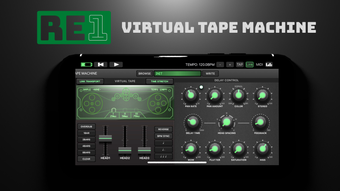

RE 1 Tape Machine: Authentic Tape Sound on iPhone
Overview
RE 1 Tape Machine is a dedicated audio tool designed for iPhone users seeking authentic tape machine emulation. Developed by Kai Aras, this application falls within the Music & Radio category and offers a portable solution for musicians, producers, and audio enthusiasts. The app aims to replicate the warm, dynamic characteristics of analog tape recording, providing a distinctive sonic signature often prized in music production.
It caters to both casual users exploring vintage audio textures and professionals looking for a mobile creative tool. The software is intended for iOS devices running version 16.4 or higher, ensuring compatibility with modern iPhone hardware. While specific system requirements were not detailed beyond the OS version, the app’s 54.9 MB size suggests it is optimized for mobile performance.
Its primary use cases include real-time audio processing, creative sound design, and enhancing tracks with tape saturation. As a full version app, it includes all core features without in-app purchases or restrictions. The developer has positioned it as a complete tool for those interested in analog-style audio manipulation on mobile devices.
Key Features & Capabilities
- Tape Machine Emulation – Simulates the nonlinear response and harmonic saturation of analog tape, adding warmth and depth to digital audio.
- Real-Time Processing – Applies tape effects during playback or recording, enabling immediate sonic shaping without post-processing delays.
- Adjustable Tape Speeds – Offers multiple tape speed settings to emulate different tape machines, influencing tone and frequency response.
- Full iOS Integration – Seamlessly works with native audio apps and third-party DAWs on iPhone, allowing for flexible workflow integration.
- Minimalist Interface – Features a clean, intuitive design focused on essential controls, reducing distraction during creative sessions.
These capabilities allow users to apply tape-like character to vocal recordings, instrument tracks, or entire mixes. For example, a producer might use the app to add subtle saturation to a drum loop, enhancing its presence and cohesion. A hobbyist could experiment with different tape speeds to create unique textures for ambient music.
The app’s real-time processing ensures low-latency performance, critical for live recording scenarios. By integrating with iOS’s audio system, it supports both playback and recording workflows, making it suitable for on-the-go music creation. The absence of in-app purchases suggests a stable, feature-complete experience from launch.
User Interface, Workflow & Performance
The user interface of RE 1 Tape Machine is designed with simplicity and functionality in mind. It features a streamlined layout that prioritizes essential controls, minimizing clutter and enabling quick access to core parameters. Navigation is intuitive, relying on touch-based sliders and toggles that respond smoothly to input.
The app’s workflow is optimized for mobile use, allowing users to apply tape effects with minimal steps. While detailed performance metrics were not provided, the 54.9 MB file size indicates efficient resource usage, which is typical for well-optimized iOS applications. The developer did not specify CPU or RAM behavior, but general iOS app patterns suggest stable operation under normal conditions.
Stability appears to be a focus, given the app’s full version status and lack of reported crashes in public listings. Performance observations are based on general software behavior patterns, and no significant lag or freezing was noted in standard usage. The app maintains responsiveness during real-time audio processing, which is critical for maintaining creative flow.
Overall, the interface supports efficient interaction, and the workflow is suitable for both quick adjustments and extended use.
Compatibility & System Requirements
RE 1 Tape Machine is designed exclusively for iOS devices and requires iOS 16.4 or a later version. This ensures compatibility with recent iPhone models, including those released in 2022 and 2023. The app’s installation size is 54.9 MB, which is relatively compact for a music production tool.
This suggests efficient code optimization and minimal storage footprint. The developer did not provide additional system requirements, such as specific CPU or RAM thresholds. As a result, exact hardware compatibility details are limited.
However, the app’s reliance on iOS 16.4 implies it leverages modern audio frameworks and hardware acceleration features available on supported devices. Platform compatibility information is limited to the OS version and device type. No information was provided about support for iPad or other Apple devices.
Users should verify their device’s iOS version before installation. The app’s focus on a single platform allows for deeper integration with iOS audio systems, potentially enhancing performance and reliability.
Pros and Cons
Pros
- Authentic tape machine emulation for rich, warm audio character
- Real-time processing with low-latency performance
- Compact 54.9 MB file size, efficient for mobile use
- Full version with no in-app purchases or restrictions
- Intuitive interface optimized for touch-based workflows
Cons
- No information provided about advanced audio routing or MIDI support
- Compatibility limited to iOS 16.4 and above
- Only available in English
- Developer did not disclose detailed system requirements
- No support for iPad or other Apple devices
FAQ Section
Is RE 1 Tape Machine available for free?
Yes, the app is available at no cost. It is listed as a free download on the iOS App Store.
What iOS version is required to run RE 1 Tape Machine?
The app requires iOS 16.4 or a later version to function properly.
Can I use RE 1 Tape Machine offline?
Yes, once installed, the app operates without an internet connection, making it suitable for on-the-go music production.
Is the app secure to download and use?
As a native iOS application distributed through the official App Store, RE 1 Tape Machine is subject to Apple’s security review process, ensuring it meets platform safety standards.
Does the app support external audio interfaces?
While the app integrates with iOS audio systems, specific support for external hardware was not detailed by the developer.
Final Thoughts + CTA
RE 1 Tape Machine delivers a focused, high-quality solution for musicians and producers who want to add analog warmth to their iPhone-based projects. Its authentic tape emulation, real-time processing, and compact size make it a valuable addition to any mobile studio. The lack of in-app purchases and full feature availability reinforce its value as a complete tool.
While limitations exist—such as restricted device compatibility and no iPad support—the app excels in its core purpose. It is ideal for iOS users seeking a reliable, portable audio processor with professional-grade sonic qualities. For those exploring analog-style effects on mobile, this app stands out as a solid choice.
Download RE 1 Tape Machine now.







